Virtual Reality (VR) and Game Design Factors
From a technological perspective, Virtual Reality (VR) is a computer-generated three-dimensional (3D) image updated in real-time to the patient to provide the illusion that they are in a Virtual Environment (VE) [100]. VR headsets offer a stereoscopic vision of the VE created by the software. Although VR has an emphasis on vision, it is not the only factor. Including more senses can potentially make it more immersive. Virtual worlds have the potential identical “standard” simulation environments [100], which would make technological solutions scalable.
On the reality-virtuality continuum [101], VR lies at the opposite end of the spectrum of reality, as it encapsulates the patient with the VE with no references to reality. As technology overlays reality, augmented reality is in the middle of the continuum. To create a convincing illusion in VR, it is necessary to understand how people perceive the environment and how that perception may be replicated by technology. The technological component of creating that objective world is immersion. However, humans are complex and even if the same objective reality is experienced, it can be perceived differently. Presence is a critical component required for the MT illusion to work. A better understanding of the mechanisms will give a better indicator of what should work. Once this is known it can assist in game design. Fundamental design decisions dramatically influence the development process such as the input devices and the advantages and disadvantages of each.
Slater and Wilbur’s [102] Framework for Immersive Virtual Environments (FIVE) makes a clear distinction between immersion and presence: “Immersion is a description of a technology and describes the extent to which the computer displays are capable of delivering an inclusive, extensive, surrounding and vivid illusion of reality to the senses of a human participant. Inclusive (I) indicates the extent to which physical reality is shut out. Extensive (E) indicates the range of sensory modalities accommodated. Surrounding (S) indicates the extent to which this virtual reality is panoramic rather than limited to a narrow field. Vivid (V) indicates the resolution, fidelity, and variety of energy simulated within a particular modality (for example, the visual and colour resolution). Vividness is concerned with the richness, information content, resolution and quality of the displays.”
Human Senses
To construct a virtual world, an understanding of the mechanisms that govern the physical world is informative on how to design and develop properties required for presence. Distal stimuli are actual objects and events out in the world (objective reality) [103]. Proximal stimuli are the energy from distal stimuli that reach the senses (eyes, ears, skin) [103].. To engage with humans, one must first be able to comprehend the processes of the senses, before learning how to represent or stimulate the sense through technology (Fig.) [103].To create an immersive technology, how the patient inputs information into the system needs to be known (Tables 3). Figure 4: Multimodal, bidirectional interaction between the patient and Virtual Environment (modified).
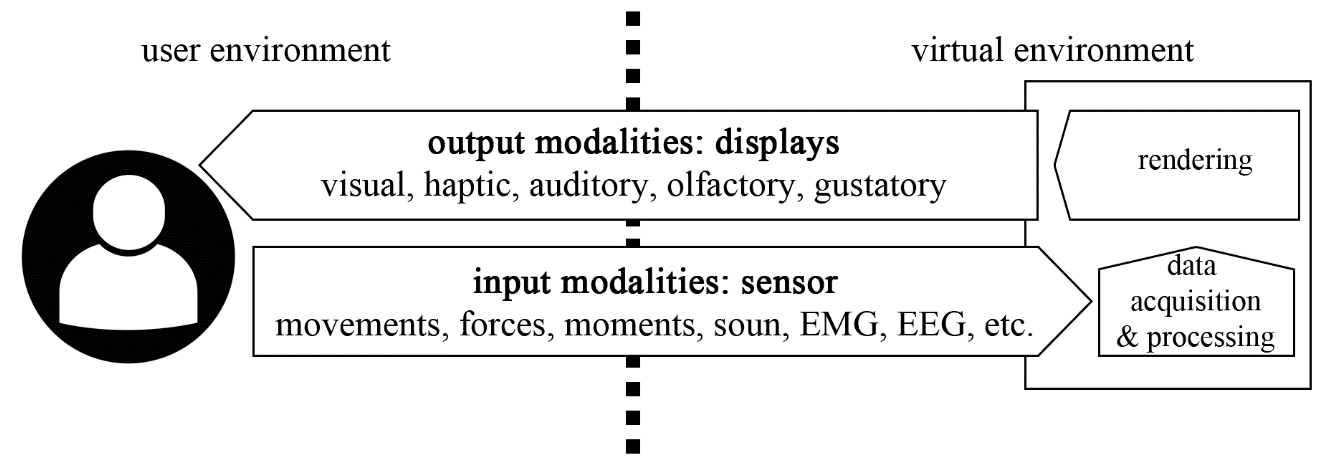
Table 3: Example of Different Input Modalities. Physiological Information Physical quantities function transferred Voice, Sound, Sound pressure, speech acoustics, frequency Measurement device examples Microphone words, commands Muscle Posture and Position, velocity, Joystick, gonio- activities, body motion; angle, Acceleration; accelerometer segmental Mechanical force, moment kinematic load and kinetics Physiological Cardiovascular Heart rate, Thermometer, functions state, temperature, electromyogram thoughts, electrophysiological (EMG), well-being electroencephalogram (EEG), pulse oxymeter Before crafting an immersive system, it is important to understand the underlying mechanisms of how things work and to see how technology is trying to replicate it.
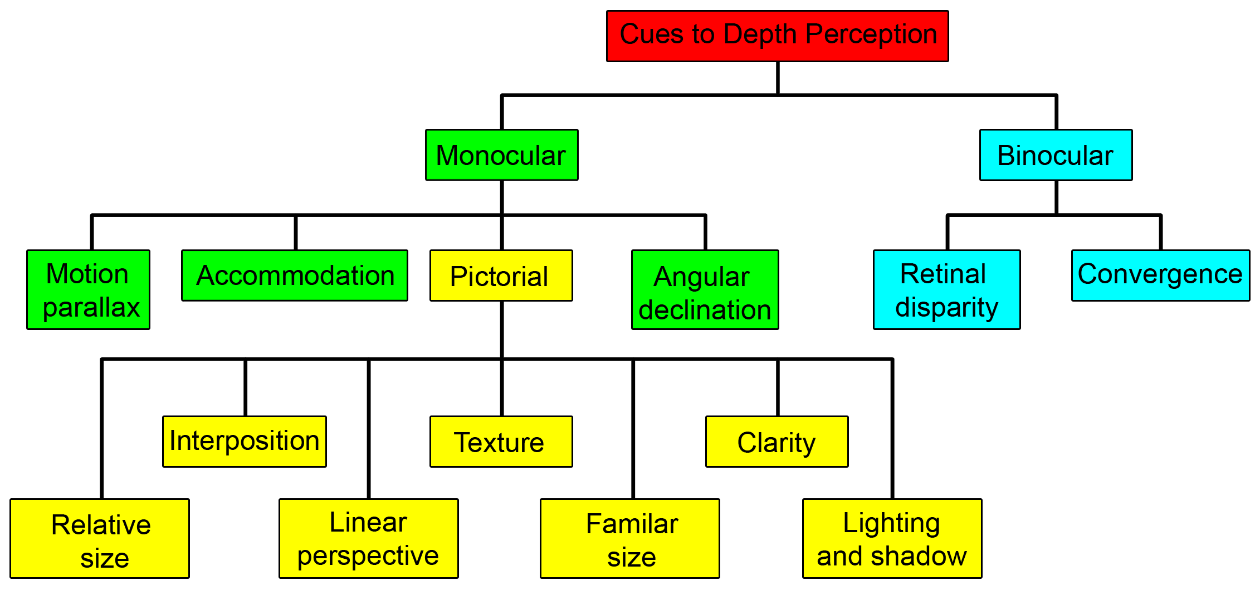
VR depth perception is integral to the design in presenting a correct environment. The value of the depth cue (Fig.) [104] varies depending on the space (Table), allowing the designer to know what to prioritise to present a believable environment to the patient. Natural perception of space in VR is still a challenge for both the display technology and the developers.
| Source of Information | Personal | Action | Vista |
|---|---|---|---|
| Occlusion | 1 | 1 | 1 |
| Binocular | 2 | 8 | 9 |
| Motion | 3 | 7 | 6 |
| Relative / familiar size | 4 | 2 | 2 |
| Shadows/shading | 5 | 5 | 7 |
| Texture gradient | 6 | 6 | 5 |
| Linear perspective | 7 | 4 | 4 |
| Oculomotor | 8 | 10 | 10 |
| Height relative to horizon | 9 | 3 | 3 |
| Aerial perspective | 10 | 9 | 8 |
Upholding a duty of care for the patients, the developer must carefully design to minimise any potential harm as myopia can develop due to environmental factors [106]. A better understanding of the mechanisms of how the eyes work allows the designer to make safer design decisions. VR headsets have not been perfected. A study on visual comfort of binocular and 3D displays by Kooi et al. [107] found that the factors for visual comfort: “The factors that determine stereoscopic viewing comfort most strongly are vertical disparity, crosstalk, and blur. Even a little amount of each (1PD, 5%, 3.4 arcmins, respectively) causes noticeable discomfort. Hyperstereopsis may cause some discomfort when the represented depth exceeds the depth-of-focus as previously reported, but the effect is rather weak. For short viewing durations, the distortions that only affect the periphery of the perceived image are less important. The quality of a person’s binocular vision affects the binocular-viewing comfort to a limited extent. Binocular misalignment and excessive stereoscopic disparity are less troublesome for people with reduced (binocular) vision.” Essentially this quote highlights the importance of proper calibration or representation of the image, so the patient is comfortable within the virtual environment to not have a negative experience. Banks et al. [108] state “Since previous 3D fads, technology has advanced for stereo media however problems of discomfort, fatigue and poor stereoscopic depth perception remain prevalent” [108]. Therefore, developers cannot relax and expect adverse effects to be resolved solely by newer hardware; the design is key. Not all literature is negative, as the study by Pan et al. [109] was established to treat amblyopia in adults with dichoptic training using the virtual reality Oculus Rift HMD. The developer may need to be aware of other eye conditions such as colour blindness to be more inclusive. Eyes strain is a concern, so any patient interface should not be too close to the patient’s face.
Perception and attitude
The system provides the immersion using technology and presence is how the patient perceives it psychologically. To make a system capable of high presence it must use immersive technologies appropriately. Even if the system has high immersion proprieties, it is just potential presence. Jerald also describes immersion and its elements as: “Immersion is the objective degree that which a VR system can project stimuli onto sensory receptors of patients such that it is extensive, matching, surrounding, vivid, interactive and plot informing.”[105]. Extensively is the range of senses presented [105]. Watching a video on mute (visual only) is less immersive than playing a video game with speakers and a vibrating controller (Visual, audio, haptic). Matching is congruence between the senses[105]. An example of matching could be the location of the patient’s avatar relative to their body; a system with multiple trackers could represent the body position more precisely than only use the VR HMD. Surroundedness is related to panoramic cues like wide field of vision (FOV) or 360o audio[105]. Current generation HMD like HTC Vive have a FOV of 110 O [110] when the natural human eye has much larger FOV when you include peripheral vision [104]. Vividness is the quality of an element such as resolution[105], colour space, frame rate and audio bitrate. Using resolution for vividness, a low-resolution circle will appear blocky and will be easily detected while a high-resolution circle will appear as a smoother curve. Plot is the story, the consistent portrayal of a message or experience [105]. Plot can be related to the narrative of the experience and therefore presence. One example of low immersion though story would be in a historical themed game introducing elements which do not exist in that historical period. A lusory attitude may be considered as a person’s capacity to accept an illusion; to be able to suspend disbelief or become immersed. If the patient has difficulty engaging with the believability of a virtual environment, then it is expected that it would be less likely that the illusions of VRMT would be effective. Many factors contribute to a lusory attitude. Efforts should be made to maximise these factors for an optimal experience.
- Pre-lusory goals: Goals that are set by the game.
- Lusory goals: Rules that are set by the game.
- Lusory attitude: a playful mindset. An understanding of entering play [111].
Being present in VE can have both physiological and psychological effects. VR can be used to treat phobias and cerebral stroke. The phenomenon of body ownership in a virtual avatar are examples that prove the strong physical and psychological effects of VR, which is an interesting area and is still the subject of ongoing research [112]. VR is a powerful medium although the exact mechanisms of presence are not completely understood.
In an exploratory study on VR HMD and their impact on player presence (Oculus Rift DK1), many participants were unable to continue playing for the whole session. The reasons cited were motion sickness, eye strain, and disorientation which are part of the cybersickness definition. The negative feeling while using VR HMD has a significant effect on patients’ enjoyment [113]. It is important to note the impact of unnatural interaction on the patient and the year of the technology used. In the future, this should continue to improve, but this is not the only factor, and design is key to minimise any detrimental effects. Minimising any undesirable side effects, allows presence to be optimised. Presence induced by technology-driven stimuli can be considered an illusion since VR stimuli are forms of energy projected onto our receptors, such as pixels or audio from a different time and place. Presence can be viewed as four main components [105]:
- Stable spatial place
- Self-embodiment
- Physical interaction
- Social presence
Presence Fidelity groups into three categories: representation, interaction and experiential [105]. The goal of VR is not necessarily to replicate reality contrary to initial thoughts; presence does not require photorealism, presence-inducing cues such as responsiveness of the system, character motion, and depth cues are more important than photorealism to achieve higher presence. Simple worlds with basic structures that provide a sense of spatial stability can be extremely compelling, and making worlds more photorealistic does not necessarily increase presence [114]. An abstract world can feel as real as a world captured by 3D scanners.
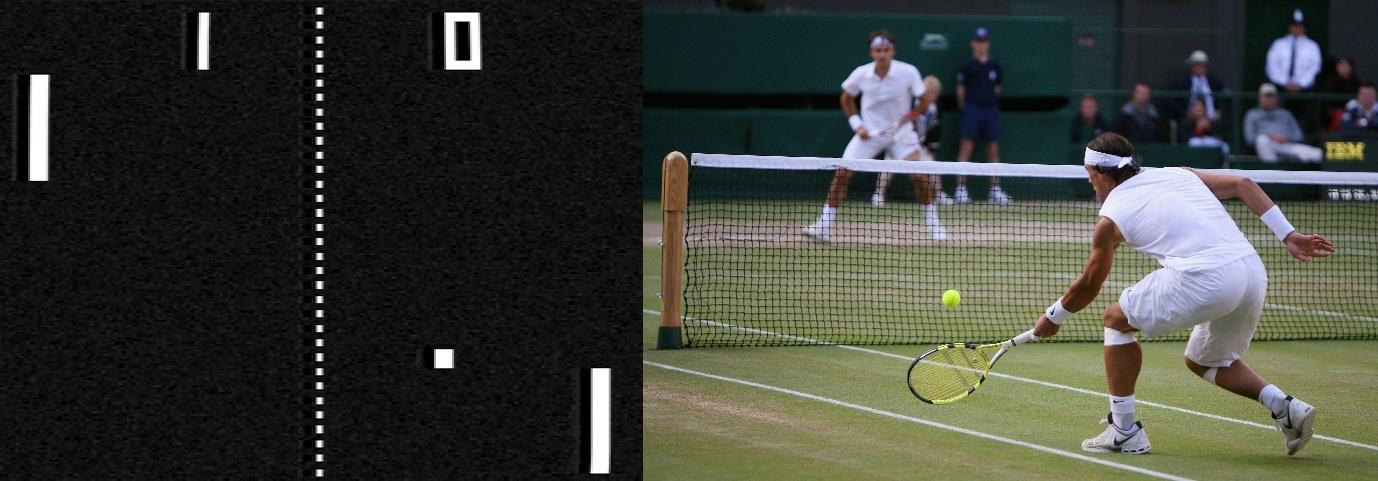
High fidelity would be photorealistic immersive film (Fig.), capturing the real world with depth cameras and microphones then recreated in VR. Low fidelity, by contrast, would be a purely abstract or nonobjective world. Blobs or colours or strange sounds may have no reference to the real world, simply conveying emotions, exploring pure visuals, or presenting other non-narrative qualities [105]. When we hear a sound, it originates from a location in space; it is an unnatural sensation to identify a sound without a visual indication. Spatial audio may dramatically increase immersion. Real-world sounds originate from a source. It’s crucial to properly blend audio values so that other noises do not obscure the spatial audio. The design of haptics, which is the feeling of touch, first depends on the input method and the availability of equipment that can provide vibrational sensations. If the application is based on a specific place, employing a suitable ambient fragrance or having a fan operate as the force of the wind while being linked to the direction of the wind in-game are other subtle possibilities [105].
Interaction fidelity is the degree to which physical actions for the virtual task correspond to physical actions for the equivalent real-world task. Low interaction fidelity risks negative training effects, as the action does not translate correctly due to motor learning principles [115]. Interaction techniques may only require minimal physical motion, such as pressing a button. Magical techniques are when patients can interact in ways not possible in the world, such as grabbing objects at the distance[105].
Experiential fidelity is the degree to which the patient’s personal experience matches the intended experience of the system creator. High experiential fidelity is when the application closely conveys what the creator intended. Low experiential fidelity would be a free-roaming world where endless possibilities exist, and every usage results in a different experience [105]. Various media that influence presence (Table ), it is possible to view each human sense and deconstruct into elements. Each element can have a low or high representation. Experiments[116] have been conducted on the effects of media on presence.
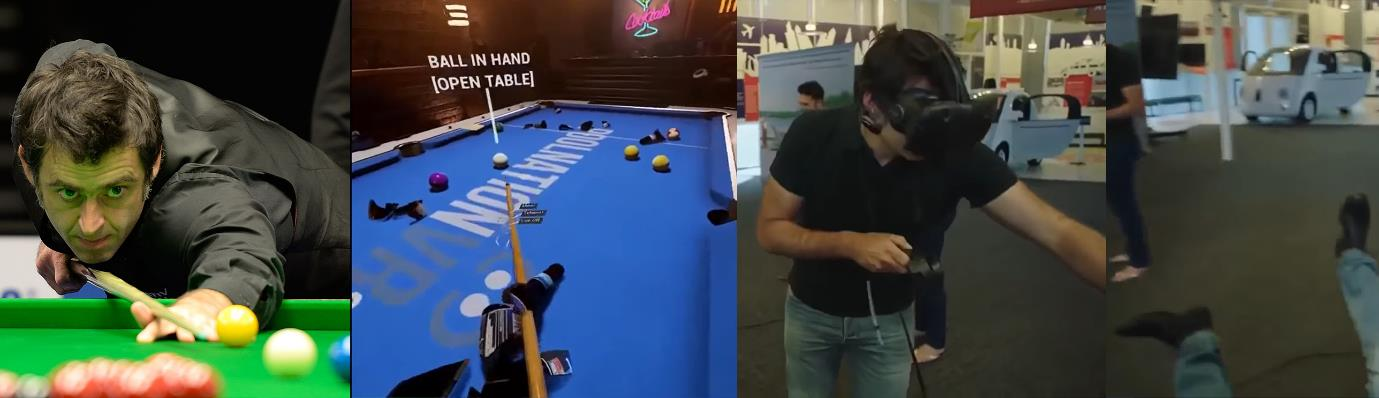
In regard to a potential risk of the user being highly immersed in the virtual environment with high presence it is worth noting there can be risks. Presenting a virtual table within VR is a potential safety hazard (Fig.), especially if there is a high presence, as the patient may forget that the object is not real and will put their weight on the virtual object expecting it to support them.
| Media | Key | Lowest | Mid | Highest |
|---|---|---|---|---|
| Audio | ||||
| Audio Cues | A | Off | On | |
| Audio Sources, nature of | A | Wrong Sound | Correct Sound | |
| Audio Sources, number of | B | Mono | Stereo | |
| Aural rendering quality | A | Low | High | |
| Collision dection, audio | B | None | Sound | |
| HRTF | B | no change | translation / rotation relative to source |
|
| Sound rotation, direction | A | no change | Doppler Effect | |
| Sound rotation, veloctiy | A | no change | Doppler Effect | |
| Spatialized audio | C | None | localised | |
| Olfactory | ||||
| Olfactory cues | B | None | “Enviroment” Smell | Object / Event |
| Tactile | ||||
| Collision dection, haptic | B | None | Feel force of collision | |
| Collision dection, tactile | B | None | Feel texture of collision | |
| Haptic force feedback | B | None | Appropriate amount of force returned | |
| Tactile cues | B | None | correct texture of relatable external object | |
| Visual detail | ||||
| Colour | B | Monochrome | Full Colour | |
| Dynamic shadows | A | off | Realistic | |
| Rendering quality | A | low | High | |
| Scene realism | C | Abstract / Cartoon | Photorealistic | |
| Texture mapping, use of | B | None (single Colour) | Mapping | |
| Texture mapping, quality | B | Low Res | High Res | |
| Visual display | ||||
| Latency, visual | B | Lag | Minimal | |
| Device, CAVE-HMD-monitor | C | |||
| Device, HMD- monitor | C | |||
| Device, projector-screen-monitor | B | |||
| Device, other | B | |||
| Field of View | B | Too extreme (wide or narrow) | Appropriate | |
| Frame Rate | B | low | 90+ | |
| Resolution | B | lower | high | |
| Stereopsis | B | None (Bi-ocular) | Yes (Binocular) | |
| Update rate | C | slow | fast | |
| Visual representation | ||||
| Behavioral realism | B | acting “weird” | Normal | |
| Fidelity of body | B | simple | complex | |
| Fidelity of hand | B | Capsule | Animated | |
| Moving between worlds | B | “Freezing” | Smooth transitioning | |
| Navigation method | C | “Forced” movement via controller etc | Room Scale Movement |
There is a relationship between presence and performance [117]. Therefore, much of the design is to maximise presence to present the best system possible for the MT illusion to work. It could be possible that VRMT could have a higher ceiling in the potential than traditional MT box. However, this needs to be tested and designed around the best-known principles. Stevens and Kincaid [117] state “Higher visual immersion was proven to increase the trainee’s presence as well as their performance”. The paper by Stevens and Kincaid [117] involved an experiment to examine the relationship between presence and performance. The sample size was 96 male United States Army soldiers who were all qualified using the M240 machine gun. They were put into two groups, novice and expert, and the treatment was HMD or LCD. The results demonstrated that “higher immersive visual display resulted in both higher performance and presence. Expertise” [117]. Conversely in “Immersion of virtual reality for rehabilitation – Review” by Rose et al. [118] makes the statement that “no distinct correlation can be outlined between increased immersion and improved user performance/motor recovery”. Since adherence is a challenge with VRMT that this virtual reality project is attempting to solve. It is crucial to make the most of how VR can create positive habits and eliminate negative ones. A succinct overview of “atomic habits”, which is about forming good habits an breaking bad habits is given by Clear which may be used by the patient to achieve discipline [119] (Table).
| # Law | How to create a good habit |
|---|---|
| The 1st Law | Make it obvious |
| 1.1 | Fill out Habits Scorecard. Write down your current habits to become aware of them. |
| 1.2 | Use implementation intentions: “I will [BEHAVIOUR] at [TIME] in [LOCATION]” |
| 1.4 | Design your environment. Make the cues of good habits obvious and visible |
| The 2nd Law | Make it Attractive |
| 2.1 | Use temptation bundling. Pair an action you want to do with an action you need to do. |
| 2.2 | Join a culture where your desired behaviour is the normal behaviour. |
| 2.3 | Create a motivation ritual. Do something you enjoy immediately before a difficult habit. |
| The 3rd Law | Make it Easy |
| 3.1 | Reduce friction. Decrease the number of steps between you and your good habits. |
| 3.2 | Prime the environment. Prepare your environment to make future actions easier. |
| 3.3 | Master the decisive moment. Optimise the small choices that deliver outsized impact. |
| 3.4 | Use the two-minute rule. Downscale your habits until they can be done in two minutes or less |
| 3.5 | Automate your habits. Invest in technology and onetime purchases that lock in future behaviour. |
| The 4th Law | Make it Satisfying |
| 4.1 | Use reinforcement. Give yourself immediate reward when you complete your habit. |
| 4.2 | Make “doing nothing” enjoyable. When avoiding a bad habit, design a way to see the benefits. |
| 4.3 | Use a habit tracker. Keep track of your habits streak and “don’t break the chain.” |
| 4.4 | Never miss twice. When you forget to do a habit, make sure you get back on track immediately. |
| Inversion of # Law | How to break a bad habit |
|---|---|
| 1st Law | Make it invisible |
| 1.5 | Reduce exposure. Remove the cues of your bad habits from your environment |
| 2nd Law | Make it Unattractive |
| 2.4 | Reframe your mind-set. Highlight the benefits of avoiding your bad habits |
| 3rd Law | Make it Difficult |
| 3.6 | Increase Friction. Increase the number of steps between you and your bad habits. |
| 3.7 | Use a commitment device. Restrict your future choices to the ones that benefit you. |
| 4th Law | Make it Unsatisfying |
| 4.5 | Get an accountability partner. Ask someone to watch your behaviour. |
| 4.6 | Create a habit contract. Make the costs of your bad habits public and painful. |
A simple mathematical example demonstrates the power of compound interest. If you improved by 1 per cent every day for a year, the improvement is 37 times better (1.01 365=37.78), while a decline of 1 per cent every day for a year the value is close to 0 (0.99 365=00.03) [119]. This is an example of why adherence is so important to the rehabilitation process. When the patient is consistent, that progression can occur. Habits are a double-edged sword, so by designing and crafting good habits, it is possible to avoid the negative edge of the sword. The system itself cannot determine the success of patients. A patient’s perception and attitude will affect the outcome. If possible, the system should attempt to promote the patient to perceive appropriately and act suitably.
Game Elements
It is essential to keep an open mind to benefit from the input provided by psychology, coaches, physios, nursing staff and other experts. Prototyping is important and needs testing so that it works before rolling out (fit for purpose). The public should not be in the testing field as people’s health is at stake. The computer developer should be technically capable, but as game design is an art, it requires an erudite mind to obtain the knowledge required. The design can be deconstructed into its elements, Schell has 100 lenses to view the game design through [120] (Table). Game design is an art, although it each element is taken into consideration, the game element “Flow” (Lense 18 out of 100) is an important element to consider for design of a game for stroke rehabilitation. Flow is an optimal state of consciousness and is a peak state where we both feel and perform at our best. It is a transformation available to anyone, anywhere, provided that certain initial conditions are met [121]. There are nine possible mental states according to Csikszentmihalyi’s flow model in terms of challenge level and skill level, which are; apathy, boredom, relaxation, worry, control, anxiety, arousal and flow [121]. Flow is the position where high challenge matches high ability.
| # | Lens | # | Lens | # | Lens | # | Lens |
|---|---|---|---|---|---|---|---|
| 1 | Essential Experience | 26 | Rules | 51 | the Pyramid | 76 | Character Function |
| 2 | Surprise | 27 | Skill | 52 | the Puzzle | 77 | Character Traits |
| 3 | Fun | 28 | Expected Value | 53 | Control | 78 | the Interpersonal Circumplex |
| 4 | Curiosity | 29 | Chance | 54 | Physical Interface | 79 | the Character Web |
| 5 | Endogenous Value | 30 | Fairness | 55 | Virtual Interface | 80 | Status |
| 6 | Problem Solving | 31 | Challenge | 56 | Transparency | 81 | Character Transformation |
| 7 | the Elemental Tetrad | 32 | Meaningful Choices | 57 | Feedback | 82 | Inner Contradiction |
| 8 | Holographic Design | 33 | Triangularity | 58 | Juiciness | 83 | The Nameless Quality |
| 9 | Unification | 34 | Skill vs Chance | 59 | Channels and Dimensions | 84 | Friendship |
| 10 | Resonance | 35 | Head and Hands | 60 | Modes | 85 | Expression |
| 11 | Infinite Inspirationm | 36 | Competition | 61 | the Interest Curve | 86 | Community |
| 12 | the Problem Statement | 37 | Cooperation | 62 | Inherent Interest | 87 | Griefing |
| 13 | the Eight Filters | 38 | Competition vs Cooperation | 63 | Beauty | 88 | Love |
| 14 | Risk Mitigation | 39 | Time | 64 | Projection | 89 | the Team |
| 15 | the Toy | 40 | Reward | 65 | the Story Machine | 90 | Documentation |
| 16 | the Player | 41 | Punishment | 66 | the Obstacle | 91 | Playtesting |
| 17 | Pleasure | 42 | Simplicity/Complexity | 67 | Simplicity and Transcendence | 92 | Technology |
| 18 | Flow | 43 | Elegance | 68 | the Hero’s Journey | 93 | the Crystal Ball |
| 19 | Needs | 44 | Character | 69 | the Weirdest Thing | 94 | the Client |
| 20 | Judgment | 45 | Imagination | 70 | Story | 95 | the Pitch |
| 21 | Functional Space | 46 | Economy | 71 | Freedom | 96 | Profit |
| 22 | Dynamic State | 47 | Balance | 72 | Indirect Control | 97 | Transformation |
| 23 | Emergence | 48 | Accessibility | 73 | Collusion | 98 | Responsibility |
| 24 | Action | 49 | Visible Progress | 74 | the World | 99 | the Raven |
| 25 | Goals | 50 | Parallelism | 75 | the Avatar | 100 | Your Secret Purpose |
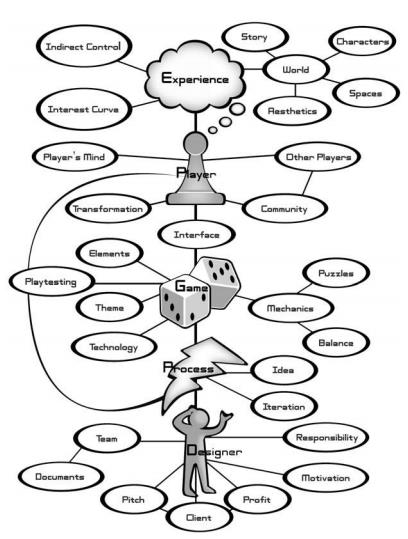
A prototype developed, addressed the need for game elements (Fig.) [120], but the vision of the system and game elements themselves await development. Previous research in the field suggests game development is complex, and many factors need consideration. The omission of an element can compromise the overall solution.
Development tools, sensors, and controllers
There are several development tools that may mostly be divided into hardware and software. Every instrument has benefits and drawbacks, just like other tools. For MINERVA, particular tools were chosen for particular features.
Hardware
Hardware selection will have a significant impact on what can be achieved. The hardware capability gives a context to what is possible in the current period. The current hardware specifications will become dated when viewed in the future, as there are areas to be improved, and advancement continues. Different implementations have different features (Table), and it is up to the designer to decide which input devices are most suitable for the application.
| Proprioception | Consistent | Usable in Lap or the Side |
Haptics Capable |
Unencumbered | Physical Buttons |
Hands-free to interact with Real World |
General Purpose |
|
|---|---|---|---|---|---|---|---|---|
| Hand Input Device Class | ||||||||
| World-Grounded Devices | x | x | x | x | x | x | ||
| Non-Tracked Hand-held Controllers | x | x | x | x | ||||
| Bare Hands | x | x | x | x | ||||
| Tracked Hand-held Controllers | x | x | x | x | x | x | ||
| Hand Worn | x | x | x | x | x | x | x | |
| Non-Hand Input Device Class | ||||||||
| Head Tracking | x | x | x | x | ||||
| Eye Tracking | x | |||||||
| Microphone | x | x | x | x | ||||
| Full-Body Tracking | x | x | x | x | x | x | ||
| Treadmills | x | x | x | x |
The type of display is probably the most restrictive element; deciding on what this is first will make other decisions easier.
There could be several ways to set up a VRMT with a traditional screen set in front of the patient. Even with rendering the reflected movement correctly, the arm could appear displaced relative to where the patient’s arm is, which could appear odd. A potential solution would be for the screen to appear like a portal, and anything within the viewport would offer a higher presence. However, this small viewport would limit appropriate available exercises. Another implementation of a traditional screen possibility would be a screen facing upwards on top of a mirror-box-like structure, limiting all exercises within the box area. 3D depth perception is possible, but it would require the usage of a 3D viewer. Passive 3D viewers filter for a stereoscopic effect, but these would be part of VR, not standard screen anymore.
Virtual Reality displays have different configurations. A Cave Automatic Virtual Environment (CAVE)[122] is a room featuring three to six walls with images projected onto them and the patient wearing 3D viewer glasses for the stereoscopic effect. CAVE set-up is not that practical for the mirror therapy illusion. The patient’s mirrored arm is difficult to link to their body in the environment because, particularly if they pan their vision, they would see the impaired arm and the illusion would break. Head Mounted Display (HMD) A stereoscopic HMD [105] presents two different images viewed in parallel by each eye, and the brain fuses these two images as a single image having depth. A VR HMD VE can display a fully immersive virtual world, both an advantage and a disadvantage. For virtual Mirror Therapy, this is positive as it can present the impaired arm moving without external interference; also, the image presented is clear when a real mirror could affect the quality of the image with things such as scratches, warping or dirt. The main disadvantage is the patient has no reference to the real-world environment when they are in the Virtual Environment using a VR HMD.
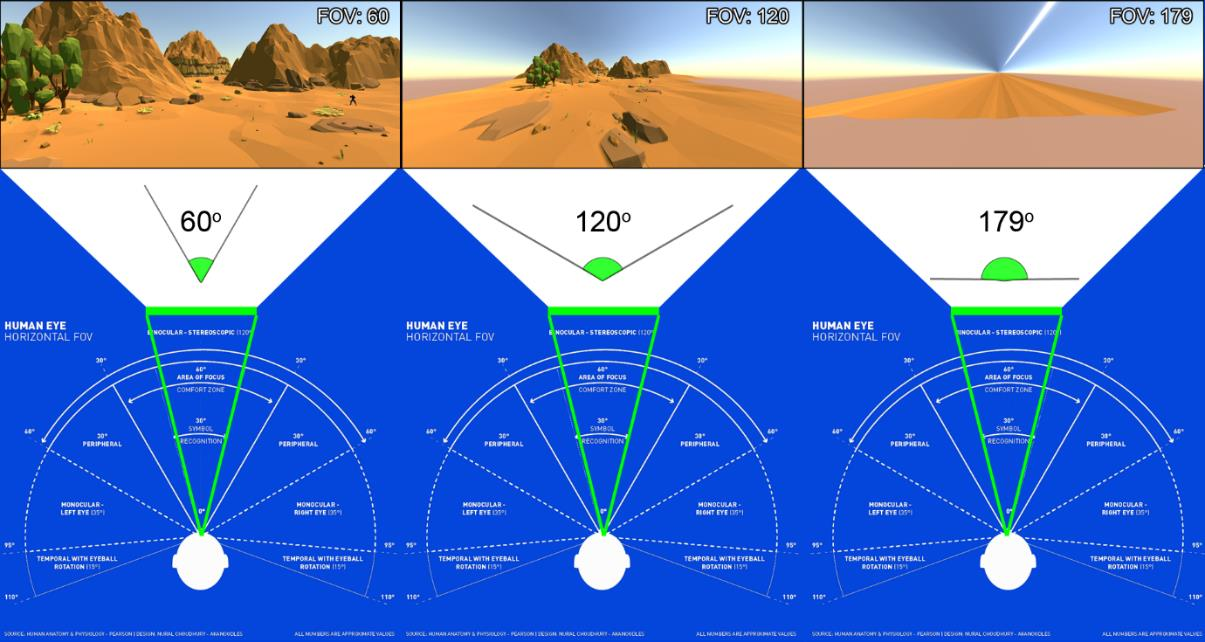
VR HMDs do not match the human Field of View (FOV) currently due to technological limitations. The larger the FOV, the more of the VE must be rendered. Distortion can occur from the lens itself. Artificially trying to increase the FOV will result in distortions that can be disorientating (Fig.). There are many options for VR HMD available. Mobile wireless headsets currently only have 3 degrees of freedom which are axis of rotation (pitch, yaw, roll), the rotation axis can be calculated using an accelerometer and gyroscope or a wired 6 DoF headset. Some are dedicated headsets, and others involve the use of a mobile phone like the Samsung Gear VR. Mobile devices have more limitations such as heat and battery life due to their design goals of wearable technology emphasising lightweight and compactness in a single package. The connection to other interaction device can be more challenging (e.g hand tracking). VR devices can be connected to a desktop or be a standalone mobile device. Desktop computers can connect to a power supply, so do not have power supply considerations like a mobile device. Desktops themselves are not restricted by weight or size as they are static and not wearable, allowing the rendering by the computer, and the HMD can focus on the visual display and relevant sensors. VR HMD devices made for the desktop environment are often designed to use 6 DoF tracking, as expected usage is to be in a room with a static base station. The relative distance calculates the headset location on each of the translation axes (Forward/Back, Sideways, Up/Down). Controllers Depending on what the goal of the system, such as gross or fine motor movement will help decide what the most appropriate type of input controller is required. A controller using the hand movement as input is usually the primary input device that is used to interact with the VR system. The type of controller used will determine the range and limits of exercises performed. It is worth deciding on the intended exercises early in the process. Are they gross motor skills using larger muscles or fine motor skills? As they are different skills and different muscles, designs for them are different. Gross movement may cover a large area, so the tracking range is important, but hand representation would not be as important since it is not the focus. The avatar should still be modelled grasping the controller correctly for congruence. Fine motor skill needs more precision in the sensors to detect fine differences in movement. Designing for gross motor movement is different, from fine motor movement, also the selection of technology impacts exercise choices and their effectiveness.
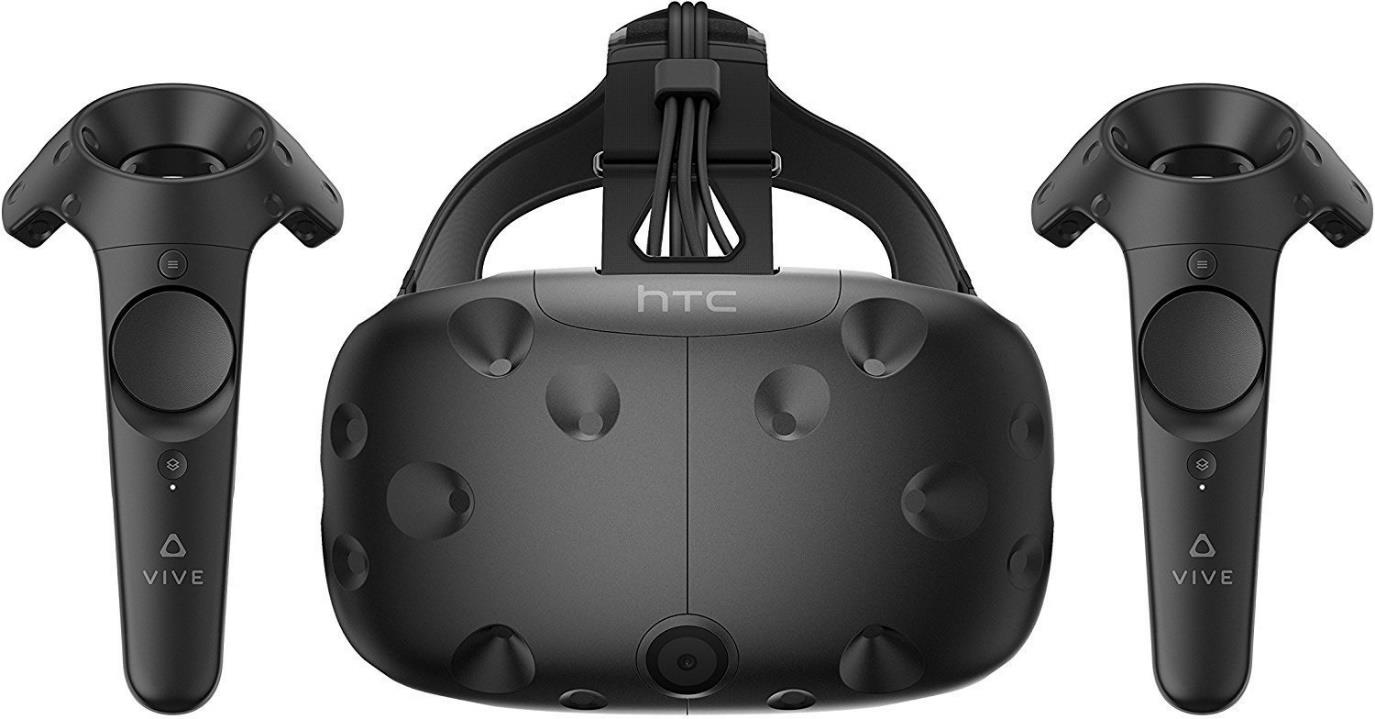
Initial development was for gross motor skills, and this used the HTC Vive controllers (Fig.). The tracked handheld controllers possess multiple positive aspects, the main one being its reliability in tracking, but also ease of use is intuitive, and the controller can be used to point and click for interactions. Controllers provide a congruent real-world reference. Vive controllers have a vibration function, and it would be interesting to test whether this additional layer of haptic feedback could stimulate and enhance the illusion of presence.
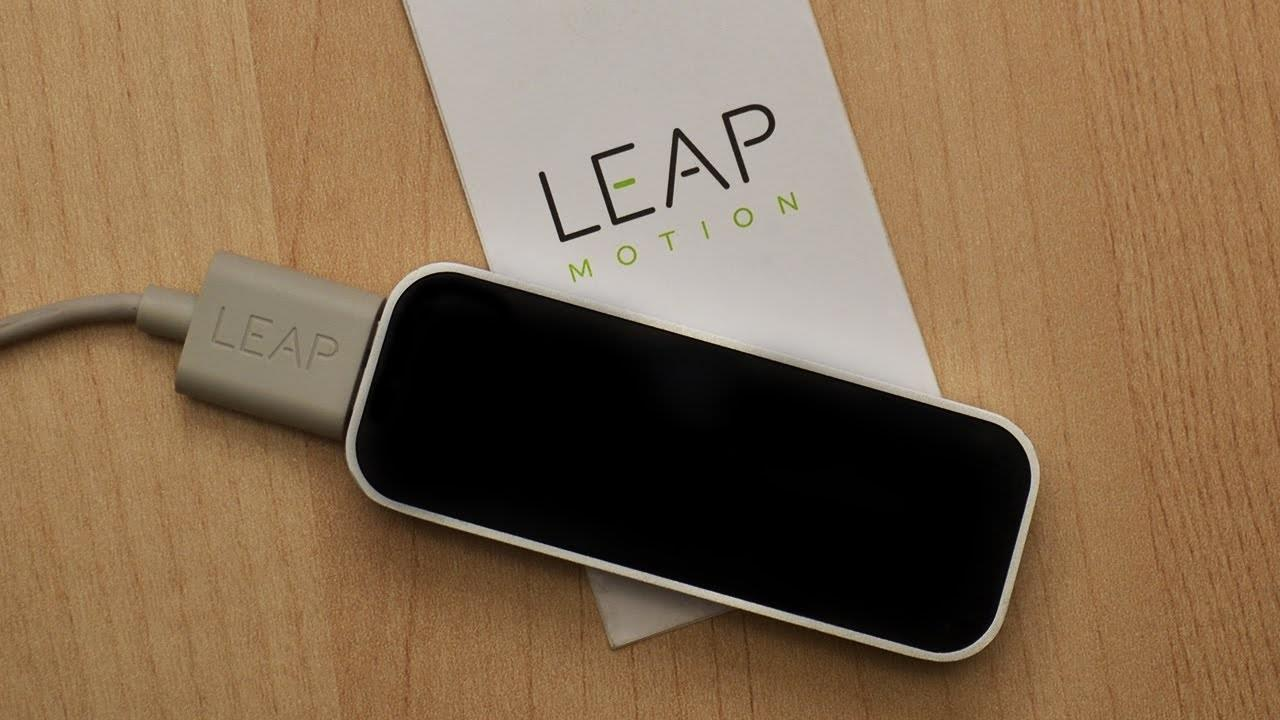
The Leap Motion Controller (LMC) (Fig.) can be classified as hand input device that uses “bare hands”, meaning the hands themselves are not constrained or need to hold anything. Bare hands are capable of proprioception, unencumbered, and able to interact with real world and are general purpose. Bare hands are not consistent as they rely on tracking in comparison to a button press. Bare hands cannot be use in the lap or to the side. No haptic feedback can occur. There is physical button to press. Smeragliuolo [123] describes the LMC as: “The Leap Motion Controller (LMC) is a low-cost, markerless motion capture device that tracks hand, wrist and forearm position. Integration of this technology into healthcare applications has begun to occur rapidly, making validation of the LMC’s data output an important research goal” [123]
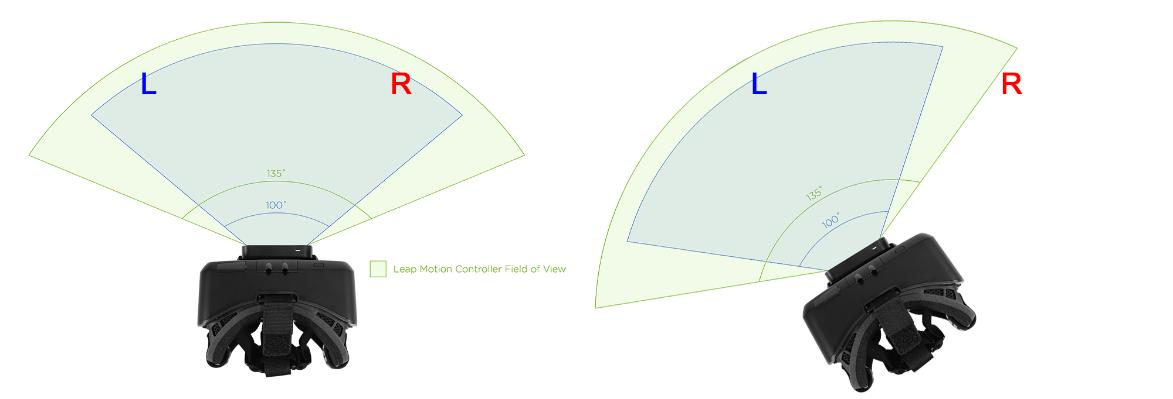
Fundamentally the Leap Motion Controller is not suitable for mirror therapy when mounted on HMD. Problems of using LEAP for VRMT (Fig.). In this example, hand [L] is the reflected image, and hand [R] is the non-impaired input. When it comes to motor skill reaching tasks, the patients focus on the target. As the FoV of the Leap Motion rotates, and the input is at the extremities, it reduces the quality and precision of the input or loses tracking altogether, breaking presence, which is unacceptable for Mirror Therapy. Loss of tracking is a high risk for breaking presence.
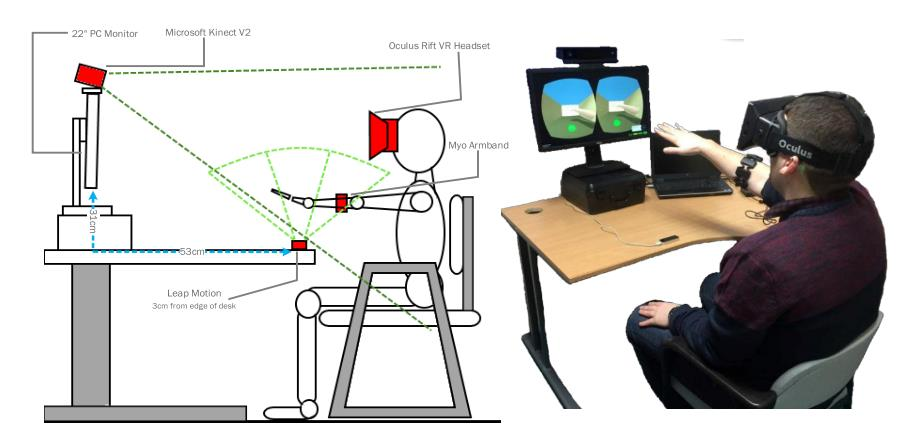
The Leap Motion can be mounted upright on a desk, the advantage being the patient’s head movement has no impact on the out-hand detection, but the disadvantage is the play area is restricted. The experimental set-up in (Fig.) is suitable for its intended purpose but is not suitable for VRMT. Evaluation of the Leap Motion controller as a new contact-free pointing device [123] states: “This study discussed the Leap Motion Controller’s functionality as a pointing device in a one-dimensional Fitts’ law-based test setup. With an overall ER of 7.2%, the error rate of the LMC is three-times higher than the error rate achieved with a standard mouse device.” There are potential ways to handle the loss of tracking, such as having the hand freeze at the last known location or having them return to a default position. However, neither option is suitable as there will be a visual mismatch for the duration of the loss, this can break presence; the primary concern for VRMT design. Gesture recognition and ease of use can be more difficult and frustrating to use in comparison to the Vive tracked controllers. The ideal solution would be to acquire Valve Index controllers, giving the benefit of tracked handheld controllers but without tracking becoming an issue. It can track finger movement like the Leap Motion controller to allow for higher presence although it uses a different method. It also has pressure sensors that could open more game design opportunities; also, the distinction between fine motor tasks and gross motor tasks would not be as constrained by the technological input device. Integrating multiple different technologies can cause unnecessary problems. It would be simpler just to use the whole VR rig, which includes VR HMD with integrated headphones and tracked handheld controllers with the ability to detect finger positions. Full Valve index kit [125] appears to be a good technical choice. Additional sensors There is a design consideration on full-body motion precision. A full-body suit would be extremely accurate but is that level required of accuracy required, and how suitable is it for the end-user? For an impaired patient, a full-body suit would be awkward even with the help of another person. Additional sensors can be considered invasive as it adds unnecessary friction in allowing the patient to access the system. The system should aim to be as smooth as possible to make adherence easier. To have more stable tracking, full-body motion tracking is possible, but the set-up time would deter patients, therefore a reasonable number of sensors is necessary. It is possible to do mirroring without any additional trackers. However, this causes the mirroring rig to become unstable. For the mirroring solution, the rig requires positional data from both shoulders to calculate the sternum position and orientation.
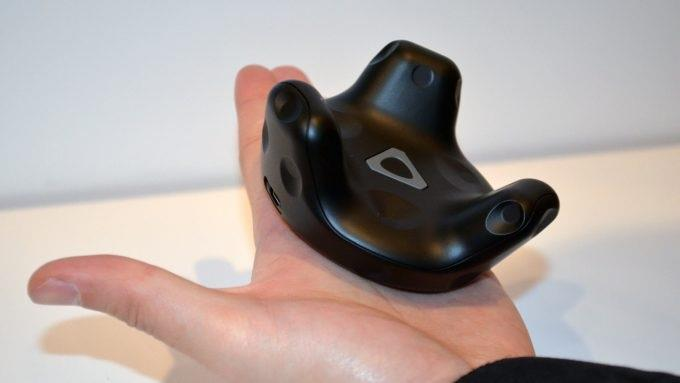
Having mirroring based on the sternum, allows head movement to be independent and does not impact any mirroring. Stability is a fundamental aspect of the mirroring system. If the sensor has data on rotation, it can map the correct location of the elbow which may allow for greater presence. MINERVA used HTC Vive pucks (Fig.), as they are additional sensors that have 6 DoF, and are the most suitable device for this purpose (Table) and was able to be used as an input device to calculate the elbow position for the inverse kinematics. In regard to presence no formal testing was done on patient so cannot be confirmed.
| SPECS | IN THE BOX |
|---|---|
| Tracking: Support for SteamVR BS1.0 and BS2.0 | VIVE Tracker 2018 |
| Status indicator: LED | Micro-USB Cable |
| Input: Pogo pin | USB dongle |
| Charging: Micro-USB | Dongle cradle |
| Attachment: 1/4-inch UNC threaded mount (standard tripod mount) |
The prototype used traditional wired headphones for sound. Having headphones can eliminate certain environmental sound signals, allowing for spatial audio. At present, no specifications come to mind on the design as it is an experimental prototype. Certain VR headsets possess integrated headphones. The mirroring system requires no further technology. Some additions that could be interesting if included are low priority. For Olfactory Display, the introduction of a specific aroma that is relevant to the theme of the game might further enhance. If was set in nature like a forest, it would use a single aroma to represent a forest. Another minor detail with the function of providing an additional layer of any in-game wind for effect would only be suitable if the aesthetic were in an environment expecting wind. Gustatory display in the context of upper limb stroke rehabilitation is not relevant, and therefore, not the best area to expend effort.
Software
The development of the VRMT system required 3D creation software. Unity3D was selected because of prior experience and familiarity with the tool. Also, Unity3D has good support for Virtual Reality. This choice is to reduce friction to speed up development.
Virtual Reality Suitability
VR has many benefits, and by exploiting its strengths, it is possible to construct a tool that will assist UL stroke rehabilitation. Virtual Reality is adaptable. The software and hardware can be upgraded and extend its lifespan to avoid become obsolete. Technology is becoming more modular as seen in the steam survey [127] and the sheer variety of hardware used. VR can exploit motor learning principles [115], [55] if designed properly. VR by itself is just a tool; it requires crafting. Poor design will deliver poor results. Figure 15: The cone of experience, VR uses many levels of abstraction.
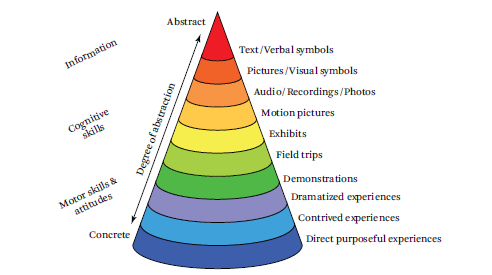
The reason VR has more potential than other mediums is that it can provide a more concrete experience [105] (Fig.) than more abstract media like text or pictures. This is because VR is a more immersive media than video or text and has more potential due to the extensiveness of media VR can use by comparison. The key experience to seek is direct and purposeful. VR is a great tool for the treatment of phobias [116], [128] as a phobia can be removed instantly by shutting off the system, while a real application may be unsafe or unfeasible. Unlike other mediums, poorly designed VR can make the patient sick. Cybersickness is not completely understood and is an issue that needs careful design to reduce the potential impact. Motion sickness and cybersickness produce the same types of symptoms but are not necessarily the same thing. Symptoms that can occur due to cyber sickness and motion sickness include: eye strain, headache, pallor, sweating, dryness of mouth, fullness of stomach, disorientation, vertigo, ataxia, nausea, and vomiting. [129],[130]. Genetic factors that make individuals more propitious to experience motion sickness[131],[132] . To summarise the factors that contribute to adverse effects [105] (Table), there are three main categories ranked by importance. There are 58 items listed, critical for a developer as it can prioritise design goals. For example, when considering system factors, it would be more important to prioritise latency (rank 1) over weight and centre of mass (rank 16).
| # | System Factors | # | Individual User Factors | # | Application Design Factors |
|---|---|---|---|---|---|
| 1 | Latency | 1 | Prior history of Motion sickness | 1 | Locus of control |
| 2 | Calibration | 2 | Health | 2 | Visual acceleration |
| 3 | Tracking accuracy | 3 | VR Experience | 3 | Physical head motion |
| 4 | Tracking precision | 4 | Thinking about sickness | 4 | Duration |
| 5 | Lack of position tracking | 5 | Gender | 5 | Vection |
| 6 | Field of View | 6 | Age | 6 | Binocular-occlusion conflict |
| 7 | Refresh Rate | 7 | Mental model / expectations | 7 | Virtual rotation |
| 8 | Judder | 8 | Interpupillary distance | 8 | Gorilla arm |
| 9 | Display response time\ and persistence | 9 | Not knowing what looks correct | 9 | Rest Frames |
| 10 | Flicker | 10 | Sense of balance | 10 | Standing/walking vs |
| 11 | Vergence / accommodation conflict | 11 | Flicker-fusion frequency threshold | 11 | Height above the ground |
| 12 | Binocular Images | 12 | Real-world task experience | 12 | Excessive binocular disparity |
| 13 | Eye separation | 13 | Migraine history | 13 | VR entrance and exit |
| 14 | Real-world peripheral vision | 14 | Luminance | ||
| 15 | Headset fit | 15 | Repetitive strain | ||
| 16 | Weight and center of mass | ||||
| 17 | Motion platforms | ||||
| 18 | Hygiene | ||||
| 19 | Temperature | ||||
| 20 | Dirty Screens |
System factors are technological problems that contribute to Cybersickness. Cybersickness may result from even slight visual misalignments and distortions. [105]. Individual User Factors, VR sickness is polygenic, including multiple genes, even though certain genes contribute to it. Sensitivity to provocative motion, the pace of adaptation, and the decay period of provoked symptoms all appear to have a significant impact on how ill people get. [105] Application Design Factors, VR sickness can still be brought on by content, even if all technological problems were completely resolved (e.g., zero latency, perfect calibration, and infinite processing resources) [105]. This means developers of the VR application still need to be both knowledgeable on how cybersickness can occur and be careful in their design decision implementation so they can avoid making potential patients sick though usage.
Summary
VR when designed poorly can make the patient sick. It is important to get a better understanding of how humans and computers interact with each other so it can be designed properly to reduce adverse effects. Vision is the most important sense for VR and is the main emphasis for design consideration, haptics is second. Other senses like smell or taste are less important in this specific case of research. More types of immersive technology that are implemented correctly can heighten perceived presence. Presence is a major factor for MT to work, therefore a lot of work goes into the design to heighten presence or to make sure it will not break presence. There is a lot of variety for hardware and software selection, depending on the design goals the developer must make calculated choices on what to implement into the system. VR appears to be suitable to not break presence for VRMT if it crafted appropriately by taking system, application and individual user factors into consideration.
References (34)
- [55] R. Schmidt, Motor Control and Learning 6th Edition with Web Resource: A Behavioral Emphasis, 6th ed. Human Kinetics Publishers, 2018. ↩
- [100] T. D. Parsons, Clinical Neuropsychology and Technology: What’s New and How We Can Use It, 1st ed. Springer, 2016. ↩
- [101] P. Milgram, H. Takemura, A. Utsumi, and F. Kishino, “Augmented reality: a class of displays on the reality-virtuality continuum,” vol. 2351, pp. 282–292, 1995, doi: 10.1117/12.197321. ↩
- [102] M. Slater and S. Wilbur, “A framework for immersive virtual environments (FIVE): Speculations on the role of presence in virtual environments,” Presence Teleoperators Virtual Environ., vol. 6, no. 6, pp. 603–616, 1997, doi: 10.1162/pres.1997.6.6.603. ↩
- [103] R. Riener, Virtual Reality in Medicine, 1st ed. Springer;, 2012. ↩
- [104] S. Schwartz, Visual Perception: A Clinical Orientation, 4th ed. McGraw-Hill Education / Medical, 2009. ↩
- [105] J. Jerald, The VR Book: human-centered design for Virtual Reality (ACM Books). 2016. ↩
- [106] C. W. Pan, D. Ramamurthy, and S. M. Saw, “Worldwide prevalence and risk factors for myopia,” Ophthalmic Physiol. Opt., vol. 32, no. 1, pp. 3–16, 2012, doi: 10.1111/j.1475-1313.2011.00884.x. ↩
- [107] F. L. Kooi and A. Toet, “Visual comfort of binocular and 3D displays,” Displays, vol. 25, no. 2–3, pp. 99–108, 2004, doi: 10.1016/j.displa.2004.07.004. ↩
- [108] M. S. Banks, J. C. A. Read, R. S. Allison, and S. J. Watt, “Stereoscopy and the Human Visual System,” SMPTE Motion Imaging J., vol. 121, no. 4, pp. 24–43, 2012, doi: 10.5594/j18173. ↩
- [109] P. Žiak, A. Holm, J. Halička, P. Mojžiš, and D. P. Piñero, “Amblyopia treatment of adults with dichoptic training using the virtual reality oculus rift head mounted display: preliminary results,” BMC Ophthalmol., vol. 17, no. 1, p. 105, 2017, doi: 10.1186/s12886-017-0501-8. ↩
- [110] “The ultimate guide to virtual reality headsets,” 2022. https://www.vrs.org.uk/the-ultimate-guide-to-virtual-realityheadsets/. ↩
- [111] K. Salen and E. Zimmerman, Rules of play: Game Design Fundamentals. MIT Press, 2003. ↩
- [112] M. Lorenz et al., “Presence and User Experience in a Virtual Environment under the Influence of Ethanol: An Explorative Study,” Sci. Rep., vol. 8, no. 1, pp. 1–16, 2018, doi: 10.1038/s41598-018-24453-5. ↩
- [113] J. M. A. Seibert, “An exploratory study on virtual reality Head Mounted Displays amd Their impact on Player presence.,” Igarss 2014, no. 1, pp. 1–5, 2014, doi: 10.1007/s13398-014-0173-7.2. ↩
- [114] P. Zimmons and A. Panter, “The influence of rendering quality on presence and task performance in a virtual environment,” Proc. - IEEE Virtual Real., vol. 2003-Janua, pp. 293–294, 2003, doi: 10.1109/VR.2003.1191170. ↩
- [115] M. F. Levin, P. L. Weiss, and E. A. Keshner, “Emergence of Virtual Reality as a Tool for Upper Limb Rehabilitation: Incorporation of Motor Control and Motor Learning Principles,” Phys. Ther., vol. 95, no. 3, pp. 415–425, 2015, doi: 10.2522/ptj.20130579. ↩
- [116] B. K. Wiederhold and S. Bouchard, Advances in virtual reality and anxiety disorders, 2014 editi. Springer, 2014. ↩
- [117] J. A. Stevens and J. P. Kincaid, “The Relationship between Presence and Performance in Virtual Simulation Training,” Open J. Model. Simul., vol. 03, no. 02, pp. 41–48, 2015, doi: 10.4236/ojmsi.2015.32005. ↩
- [118] T. Rose, C. S. Nam, and K. B. Chen, “Immersion of virtual reality for rehabilitation - Review,” Appl. Ergon., vol. 69, no. February 2017, pp. 153–161, 2018, doi: 10.1016/j.apergo.2018.01.009. ↩
- [119] J. Clear, Atomic Habits. Random House Business, 2018. ↩
- [120] J. Schell, The Art of Game Design: A Book of Lenses, 2nd ed. A K Peters/CRC Press, 2014. ↩
- [121] S. Kotler, The Rise of Superman: Decoding the Science of Ultimate Human Performance. Quercus, 2015. ↩
- [122] C. Cruz-Neira, D. Sandin, T. DeFanti, R. Kenyon, and J. Hart, “The CAVE: audio visual experience automatic virtual environment,” Commun. ACM, vol. 35, no. 6, pp. 64–72, 1992, doi: 10.1145/129888.129892. ↩
- [123] D. Bachmann, F. Weichert, and G. Rinkenauer, “Evaluation of the leap motion controller as a new contact-free pointing device,” Sensors (Switzerland), vol. 15, no. 1, pp. 214–233, 2014, doi: 10.3390/s150100214. ↩
- [124] D. E. Holmes, D. K. Charles, P. J. Morrow, S. I. Mcclean, and S. Mcdonough, “Usability and performance of Leap Motion and Oculus Rift for upper arm virtual reality stroke rehabilitation,” Int. Conf. Disabil. Virtual Real. Assoc. Technol., no. January 2017, pp. 217–226, 2016. ↩
- [125] “Valve Index VR Kit on Steam,” 2020. https://store.steampowered.com/sub/354231/. ↩
- [126] “VIVETM | VIVE Tracker,” 2020. https://www.vive.com/us/vive-tracker/. ↩
- [127] “Steam Hardware & Software Survey: July 2020,” 2020. https://store.steampowered.com/hwsurvey/. ↩
- [128] P. M. G. Emmelkamp, M. Krijn, A. M. Hulsbosch, S. de Vries, M. J. Schuemie, and C. A. P. G. van der Mast, “Virtual reality versus exposure in vivo: A Comparative Evaluation in Acrophobia,” Behav. Res. Ther., vol. 40, no. 5, pp. 509–516, 2002, doi: 10.1016/S0005-7967(01)00023-7. ↩
- [129] J. J. LaViola, “A discussion of cybersickness in virtual environments,” ACM SIGCHI Bull., vol. 32, no. 1, pp. 47–56, 2000, doi: 10.1145/333329.333344. ↩
- [130] J. Barrett, “Side effects of virtual environments: A review of the literature.” pp. 1–58, 2004, [Online]. Available: http://oai.dtic.mil/oai/oai?verb=getRecord&metadataPrefix=html&identifier=ADA426109. ↩
- [131] B. S. Hromatka, J. Y. Tung, A. K. Kiefer, C. B. Do, D. A. Hinds, and N. Eriksson, “Genetic variants associated with motion sickness point to roles for inner ear development, neurological processes and glucose homeostasis,” Hum. Mol. Genet., vol. 24, no. 9, pp. 2700–2708, 2015, doi: 10.1093/hmg/ddv028. ↩
- [132] L. et al G. Farkas, M. J. Katic, and C. R. Forrest, “International Anthropometric Study of Facial Morphology in Various Ethnic Groups/Races,” J. Craniofac. Surg., vol. 16, no. 4, pp. 615–646, 2005, doi: 10.1097/01.scs.0000171847.58031.9e. ↩